Flashcard Hero Launches Today
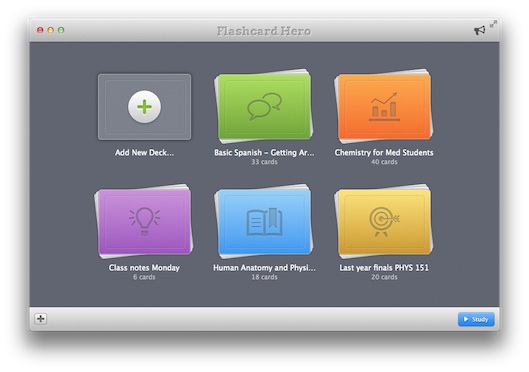
As of today, Flashcard Hero is available worldwide through the Mac App Store at an introductory price of $6.99. Flashcard Hero is our brand new study app. You can make your own virtual flash cars in a word processor-like environment including numbered lists and text formatting such as bold and italic. Highlight is the ability to group cards into topics and sub-topics (for example to reflect chapters in a text book).
Promo codes for review copies are available. Just get in touch.
More details about the app: http://flashcardhero.com
Download: Mac App Store
Flashcard Hero app preview
Flashcard Hero is our brand new study app, available for preview starting today. Make your own flashcards in a easy to use, word processor-like app. We made the app especially for those of you who use flashcards for more than language learning. There's plenty of room on the cards and you can use text formatting and lists to structure your thoughts.
The most loved feature by med students who tested the app is the ability to group cards into topics and sub-topics to reflect chapters in a text book.
Literally hundreds of hours went into polishing the app and making it really easy to use. It's the best app we've ever made!
Download it here: http://flashcardhero.com
Lots of new features in Desktop Groups version 1.3
Based on lots and lots of user feedback, this new version of Desktop Groups comes with many new features and improvements. Most notably: two-line file names, auto-updating preview icons, and the ability to rename files from within groups. Thank you for everybody who took the time to get in touch with suggestions!
Here the complete list of changes:
- New: Two-line file names
- New: Auto-updating groups (when files are added, renamed, moved, etc.)
- New: Renaming files and folders by pressing Enter
- New: Move files to Trash (via context menu, drag to Trash, Command - Backspace)
- New: Command - O now opens the selected file
- Improved: Groups now don't overlap desktops in Mission Control
- Improved: Esc key clears the selection
- Improved: When closing a group, files are moved to Desktop automatically
- Improved: group windows now always remain inside the visible area of the screen
- Improved: "Desktop Groups" folder can now be moved through Finder
How to update?
You can update via the Mac App Store.

Group related files on your desktop with Desktop Groups
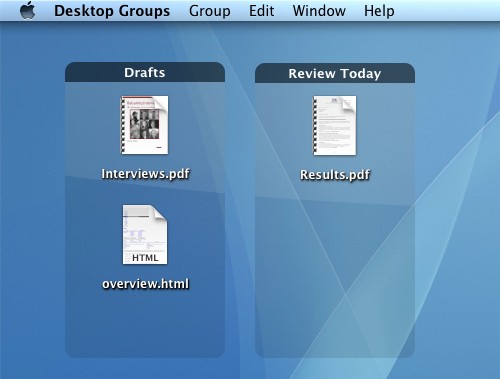
If your workflow includes keeping many files on the desktop then Desktop Groups (Mac App Store link) may be an app for you. You can organize files into groups on your desktop that you can move around, resize, and rename.
Each group has a title so that you can organize your files any way you like. For example, you could create separate groups for each project you are working on, or add separate groups for photos and text documents. If you frequently take screenshots, that would be another good fit for a group. The possibilities are endless.
More details:
You can find more information about the app and a large screenshot in the Mac App Store.
Beautiful Desktop Backgrounds with Desktop Pins
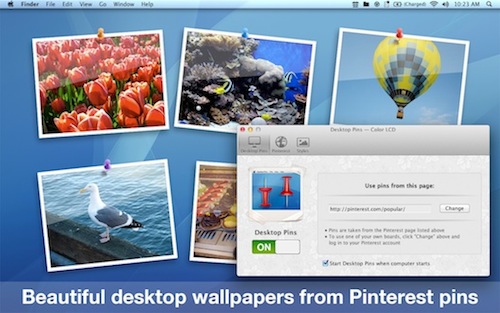
Turn Pinterest into an endless source for beautiful desktop wallpapers with our latest app Desktop Pins (Mac App Store link).
It's the perfect wallpaper that never gets boring with the latest pins from Pinterest updating automatically. You can use pins from any Pinterest page, categories, boards of your friends and followers, and of course pins from your own boards.
Pins are reshuffled every 10 minutes and refreshed from Pinterest every hour.
Endless possibilities:
For example, you can stay up to date with pins from people you follow (just log in to your Pinterest account and use pins from the main page). To keep up with what’s popular on Pinterest, use the “popular” category. How about some vacation ideas? The “Travel & Places” category is perfect for that.
More ideas:
You could start to collect pins on boards specifically for your desktop background depending on your mood, the season, inspiration, vacation ideas, and so on. Be creative and let us know what you come up with!
Here's how it works:
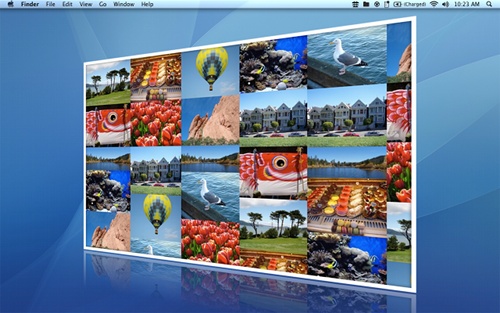
Get the app from the Mac App Store and open it. Select any Pinterest page you like (category, board, etc.), pick a background style and you're all set.
You don't even need a Pinterest account. You can still use pins from all categories and other Pinterest users.